Muse invite code
Copy a community-shared Muse referral code (invite code). Redeem it within 48 hours of signing up. You and the person who shared it each get 1 billion free Muse tokens.

- 1,000,000,000
- tokens for each person
- 48 h
- to redeem after sign-up
- 24 h
- visibility after each confirmation
How to redeem
Create your Muse account
Sign up at muse.ai/join or in the Muse app for iOS or Android. Muse is invite-gated in some regions, so you may land on a waitlist first.
Open the redeem screen within 48 hours
- Settings
- General
- Redeem invite code
The 48 hours start when your account is created.
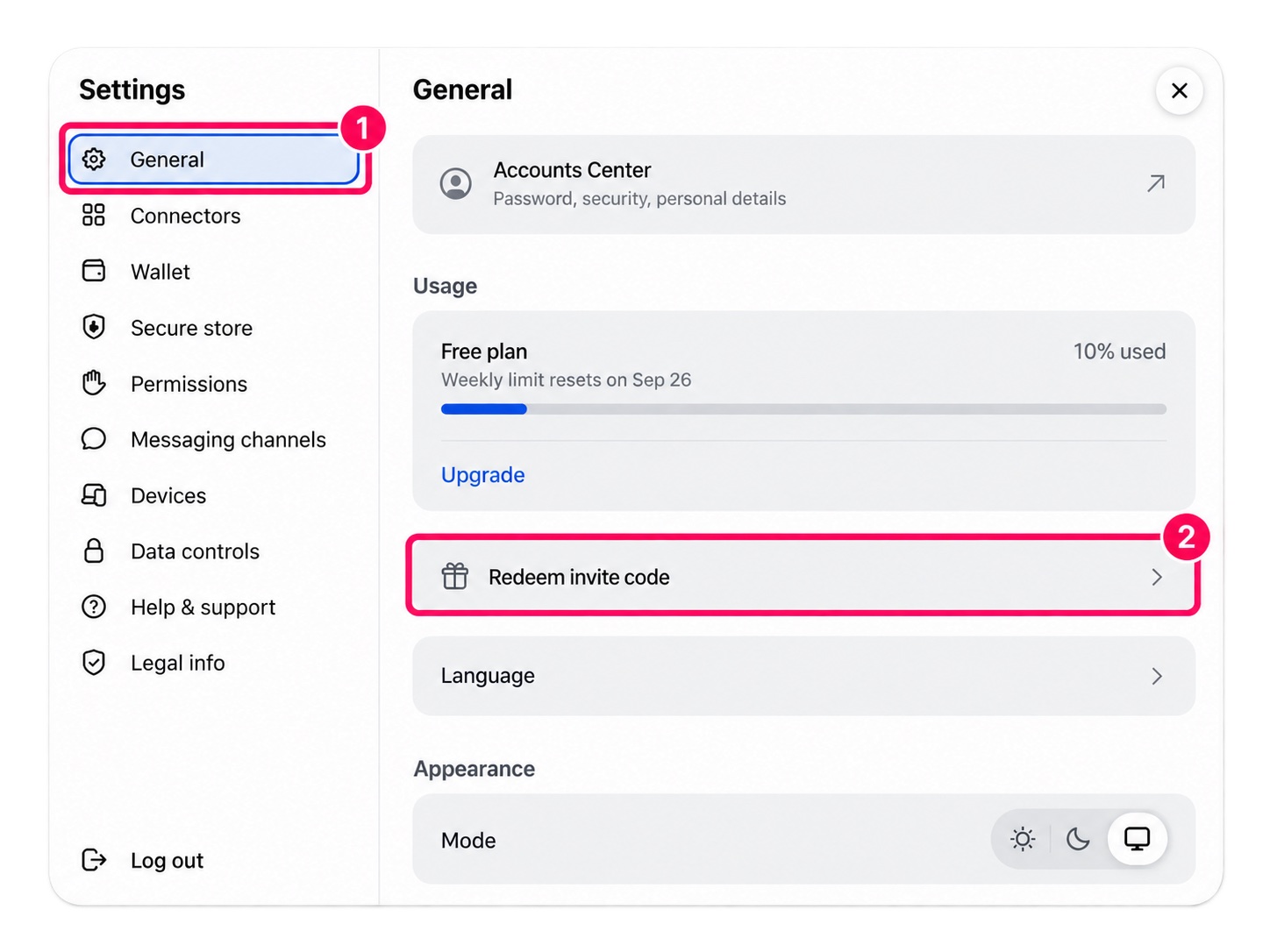
Select General, then Redeem invite code. Tap the image to enlarge. Enter the code and confirm
Type
the code shown aboveexactly as shown, in capital letters, and confirm. The 1 billion tokens are added to both accounts.
Questions
- What is Muse?
- Muse is Meta's personal AI agent, launched in September 2026. You give it a task, such as sending an email, booking a flight or filling out a form, and it works through it in a browser on your behalf. It runs at muse.ai, in the iOS and Android apps, and in WhatsApp.
- What do I get with this invite code?
- 1 billion Muse tokens, credited when you redeem a valid code in time. The person who shared the code gets the same amount. That is how Meta’s referral program works.
- Where do I enter my Muse referral code?
- In Muse, open Settings → General → Redeem invite code, enter the code shown above within 48 hours of creating your account, and confirm. This is the code for the referral reward; regional access and waitlist restrictions still apply.
- How does the 48-hour limit work?
- The window starts when you create your account. After 48 hours the account can no longer redeem an invite code, so do it right after signing up.
- The app says the code is used up. What now?
- Each code can only be redeemed a limited number of times. If it is used up, select Next to try another code. Each confirmation keeps a shared code visible for 24 hours; Muse confirms the actual remaining uses.
- Where is Muse available?
- Access is invite-gated and depends on your region, and some people are placed on a waitlist. If you can't create an account, Muse is not open in your region yet. The code only helps once you have an account.
- Should I pay for an invite code?
- No. Invite codes are free to share, and every Muse user gets their own. Never pay for one, and never give anyone your account password.